

Know What Needs You Before Anyone Asks
Know on Monday what needs you, see early when scoring will run late, and get the funder report built for you.IdeaScore tells you on Monday what needs you this week, warns you when scoring will run late, suggests a panel for a whole round and builds the report your funders ask for. You make the calls; the chasing and the counting are done for you.


Your Week, with Less Chasing
What a week looks like once IdeaScore keeps the counts and the reminders.
Monday, 08:00
The Monday brief
Tuesday
Is scoring on track?
Wednesday
A panel for the next round
Thursday
The cohort's month
Friday
A report for your funders
What IdeaScore Does for a Programme Manager
Your week in counts, and in plain words
Scores, reviews, decisions and bounced emails from the last 7 days, each opening where it happened, and the Monday brief in your inbox at 08:00.This Week sits on each programme's dashboard and counts the last 7 days from your own records: scores in and who gave most, applications reviewed, decisions by outcome, and emails sent with any that bounced. Each figure opens the page where it happened. Summarise my week turns the counts into a few plain lines with sources, and every Monday at 08:00 the Monday brief brings the week to your inbox.

- 41
- 23
- 12
- 96
Your week in plain words
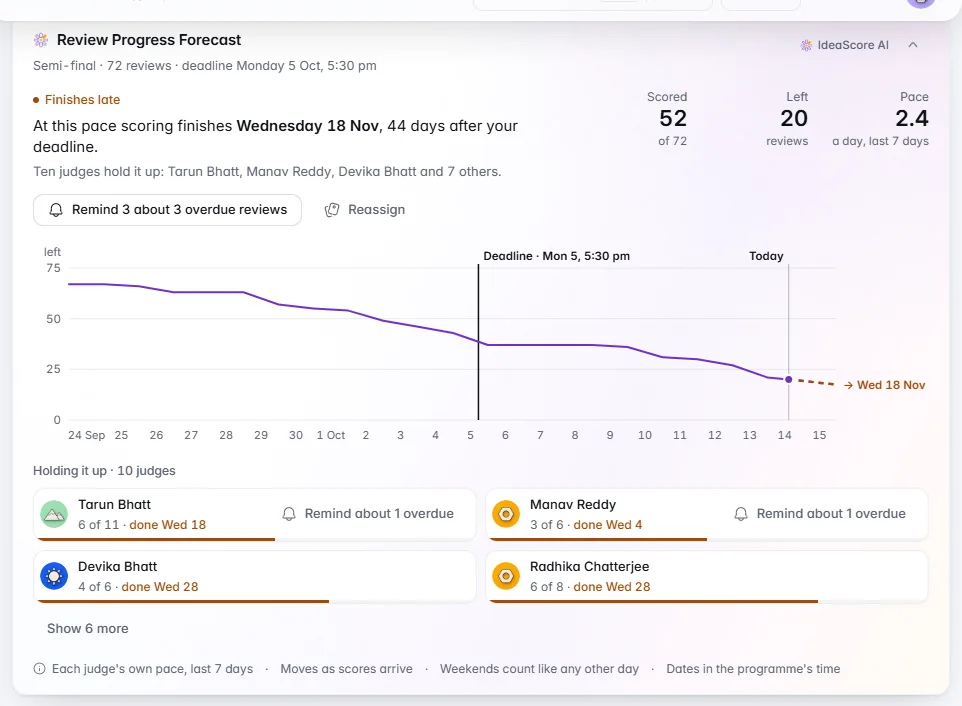
Know early if scoring will run late
A finish date from each judge's own pace, who is holding it up, and Remind or Reassign on the card.Review Forecast works from each judge's own pace over the last 7 days, so a judge who is behind shows as the slow tail instead of being averaged away. It names who is holding scoring up, with Remind for overdue reviews and Reassign when the finish falls after your deadline. Reminder Effect, beside it, shows whether reminders actually get reviews scored.

A panel for the whole round in minutes
IdeaScore AI proposes evaluators for each team with the reason for every match. Accept, swap or skip, then save.Choose the teams short of evaluators, or the whole round, and IdeaScore AI proposes evaluators for each, with the reason for every match. Open conflicts, full loads and people already on the team are ruled out first. You accept, swap or skip each team; nothing is assigned until you save, and one Undo puts it all back.
The cards you check first, at the top
Pin, hide and reorder cards, and add cards from other pages to a programme's dashboard. Only you see your arrangement.Pin the card you check first, hide the ones you do not need and put the rest in your own order. On a programme's dashboard, add cards from other pages, such as Review Forecast from Assignments or Time Saved from IdeaScore AI. Only you see your arrangement, it follows you to any device you sign in on, and hiding a card never changes a figure.
Which companies need you this month
Every open or due milestone this month on one line, and the three companies to look at first, each with its reason.On a cohort's Members tab, Cohort Health puts every milestone open or due this month on one line, marked overdue, missed, report to review, due or done. Under it are the three companies to look at first, blocked before at risk, each with its reason in a sentence, so your monthly check-in starts with the right call.
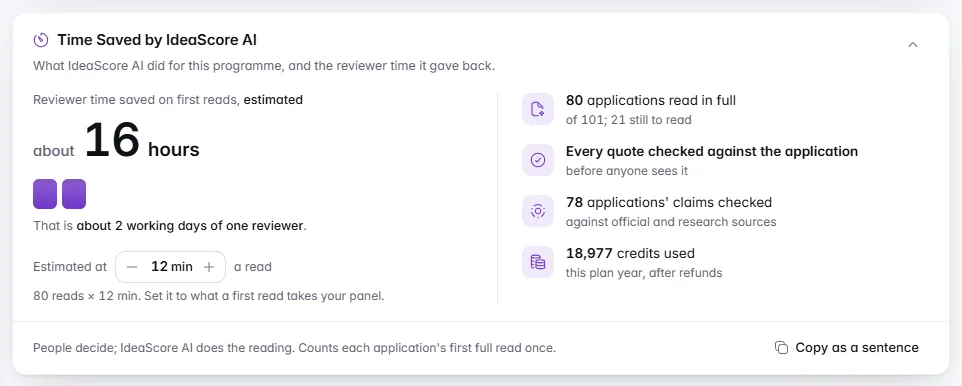
Show what IdeaScore AI gave back
Applications read in full, turned into reviewer hours at the minutes a read you set, always an estimate, with a sentence to copy.Time Saved by IdeaScore AI counts the applications it read in full and turns them into reviewer hours at the minutes a read you set, rounded down and always marked as an estimate. It also says every quote it relied on was checked against the application. Copy as a sentence gives you one line for a renewal note, a funder update or a board pack.
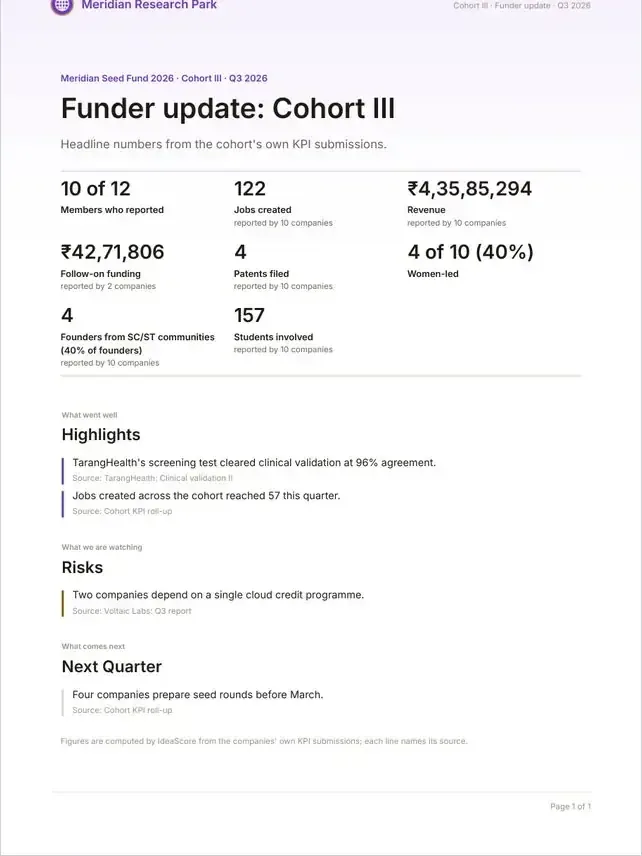
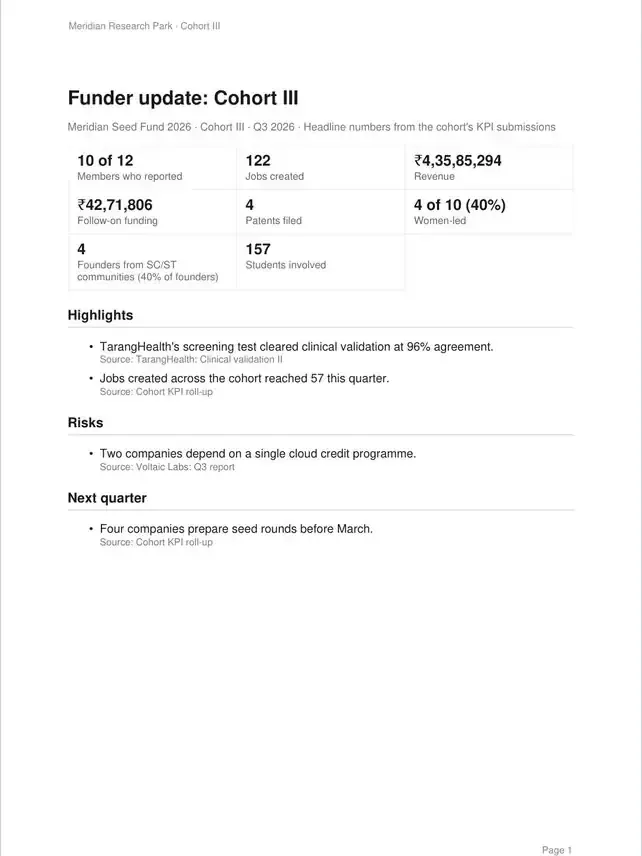
A report for the people who backed you
Pick the parts, then download an A4 PDF in your colours or share a private link you can stop. Counts only; nobody is named.Choose what goes in and watch the report change beside you: headline numbers, the journey from form to decision, judging, and the winners as your event page shows them. Download an A4 PDF in your organisation's colours, or share a private link you can stop at any time. It shows counts, never people: no applicant, judge or voter is named.
Set up in your first week, one step at a time
Five steps to IdeaScore AI's first read, a set-up guide for every programme, and a tour on every main page.A new organisation opens on Your first week: five steps to the moment IdeaScore AI reads an application for you, each saying what it is for and about how long it takes. Every programme also gets its own set-up guide, from publishing the form to getting decision letters ready, and every main page has a short tour you open from its menu.

What IdeaScore AI Does for You Here
It reads, counts and drafts; you decide what happens next.
Summarise my week
Free · reads this week's activity counts
Suggest evaluators
Conflicts and full loads are ruled out before it sees anyone
Highlights for a funder report
A draft for you; nothing is sent
A few lines in the Monday brief
Free · never reads applications, notes or email addresses
What It Takes Off Your Plate
Chasing judges
Writing the weekly update
Building panels by hand
Compiling funder reports
Issuing certificates
Checking who heard back
Explaining a decision later
Marking milestones
Training new colleagues
Setting up from scratch
Chasing judges
Writing the weekly update
Building panels by hand
Compiling funder reports
Issuing certificates
Checking who heard back
Explaining a decision later
Marking milestones
Training new colleagues
Setting up from scratch
Questions Programme Managers Ask
See Your Programme's Week in IdeaScore
A 30-minute walkthrough with a product specialist, using your programme's form, rubric and rounds.
Your Week, with Less Chasing
Monday, 08:00The Monday brief
TuesdayIs scoring on track?
WednesdayA panel for the next round
ThursdayThe cohort's month
FridayA report for your funders
What IdeaScore Does for a Programme Manager
Your week in counts, and in plain words
Scores, reviews, decisions and bounced emails from the last 7 days, each opening where it happened, and the Monday brief in your inbox at 08:00.
- A programme with nothing to report skips the brief, so a quiet Monday stays quiet
- Each plain-words line is checked against the card's own figures
- 41
- 23
- 12
- 96
Your week in plain words
Know early if scoring will run late
A finish date from each judge's own pace, who is holding it up, and Remind or Reassign on the card.
- Appears after three days of scoring, so it is never a guess
- Past the deadline, the line turns amber and says Finishes late
A panel for the whole round in minutes
IdeaScore AI proposes evaluators for each team with the reason for every match. Accept, swap or skip, then save.
- Each person's load before and after, with a warning before anyone goes over
- Accept all without a conflict, in one click
The cards you check first, at the top
Pin, hide and reorder cards, and add cards from other pages to a programme's dashboard. Only you see your arrangement.
- Cards include Decision Trail, Application Funnel and Every Applicant Heard Back
- Reset to default puts the page back in one step
Which companies need you this month
Every open or due milestone this month on one line, and the three companies to look at first, each with its reason.
- Blocked: a milestone missed or a request turned down in the last 60 days
- A health you set by hand always wins
Show what IdeaScore AI gave back
Applications read in full, turned into reviewer hours at the minutes a read you set, always an estimate, with a sentence to copy.
- Starts at 10 minutes a read; owners and programme admins change it
- Each application counts once, however many rounds it went through
A report for the people who backed you
Pick the parts, then download an A4 PDF in your colours or share a private link you can stop. Counts only; nobody is named.
- A closing note built from your real figures, signed by you
- For a cohort, IdeaScore AI drafts highlights from accepted milestone reports
Set up in your first week, one step at a time
Five steps to IdeaScore AI's first read, a set-up guide for every programme, and a tour on every main page.
- Steps tick themselves from what you have really done
- Each finished step says how long it took