



Plan the session, then follow it on one track
Lineup, running order, timings, breaks and jurors in one place. On the day, the run sheet shows the session as one track and whether you are running late.
Plan the session in one place, run it from one screen with a board the whole hall can read, and publish results that open with the winners.
Plan the session, run it on one screen the whole hall can read, and publish results that open with the winners.
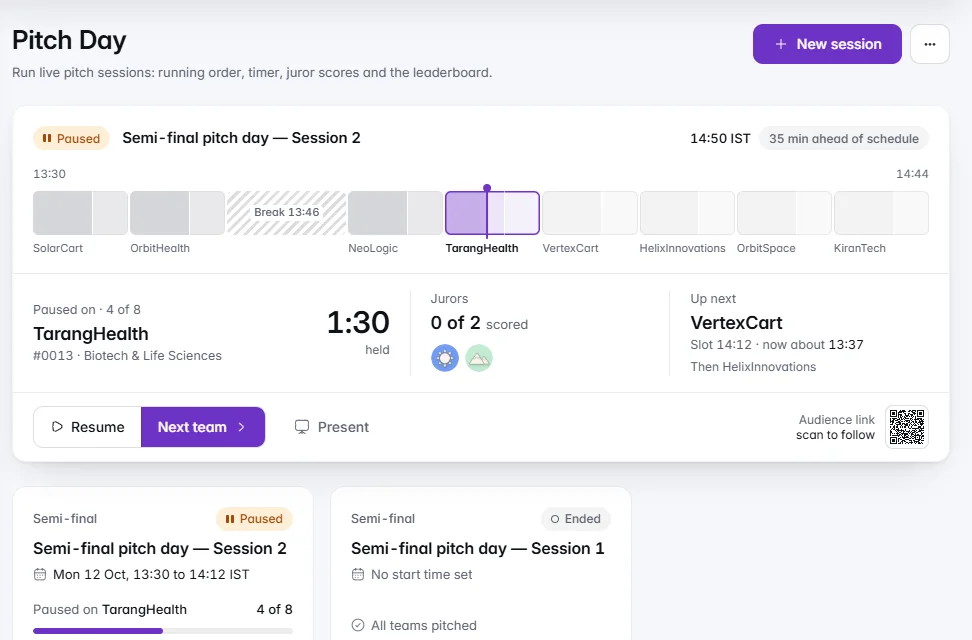
Lineup, running order, timings, breaks and jurors in one place. On the day, the run sheet shows the session as one track and whether you are running late.Build the lineup in one place: search and select the teams, drag the running order, set the time for each pitch, its questions and the breaks, choose the jurors and preview the projector before the day. While a session runs, the run sheet shows it as one track, with a marker that moves with the timer and how far you are ahead of or behind schedule.
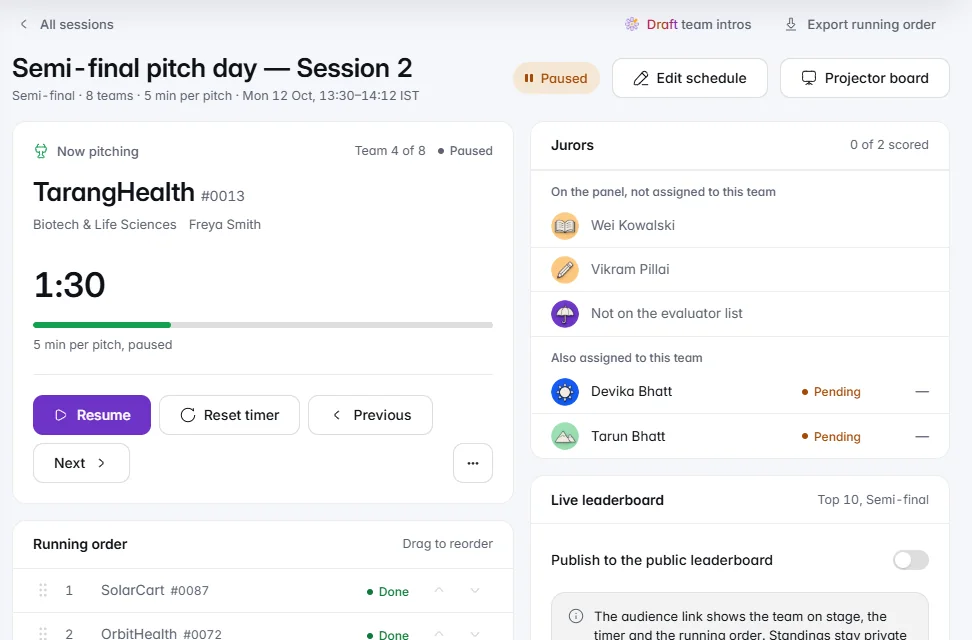
The team on stage, the timer, jurors and running order on one screen. On a bad connection the last good view stays up and the countdown keeps running.Live control keeps the team on stage, the timer, the jurors and the running order on one screen, updating quietly. Jurors' scores are saved as they go and sent again if the connection drops. The board and the audience page say Live only when their figures are fresh; otherwise they say Reconnecting, dim the standings and keep the last good view, and the countdown keeps running.
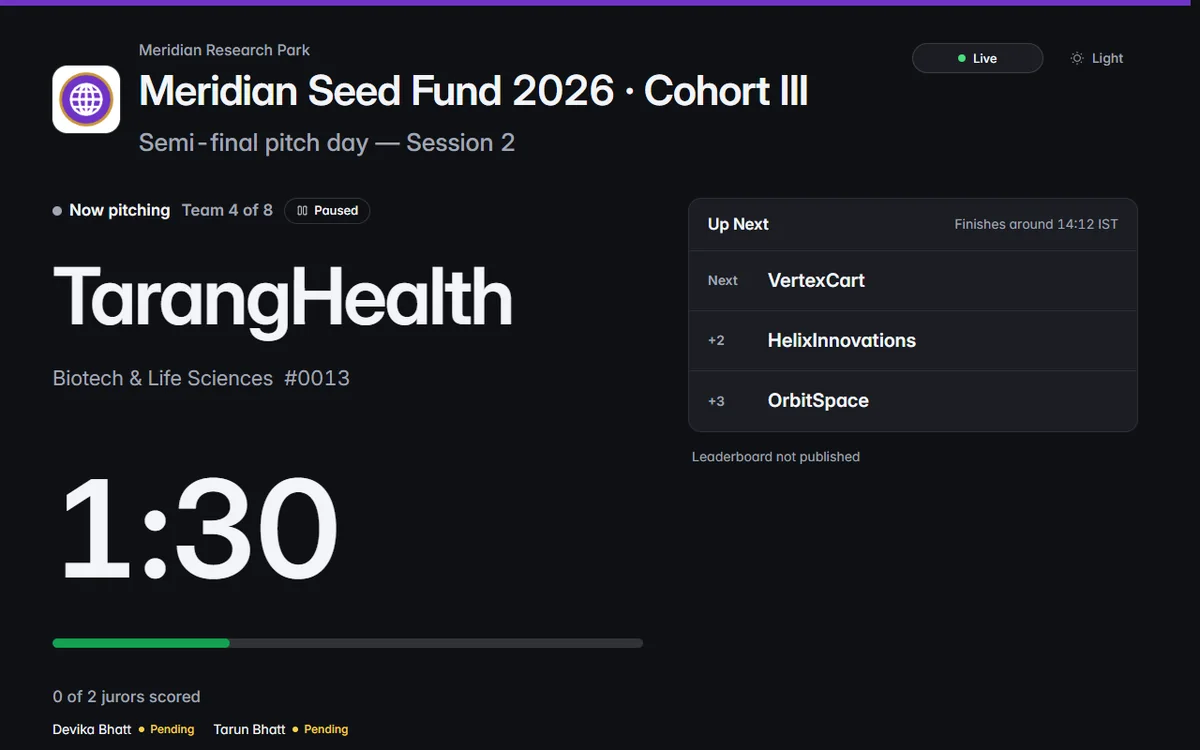
The team on stage as the hero, a timer the back row can read and your branding throughout. The board follows light or dark.Present opens the projector board in its own tab, and the audience link puts the room's view on any phone. The programme and session names sit large at the top, the team on stage is the hero, the timer reads from the back row, and your organisation's branding runs throughout. The board follows light or dark, so it looks right on a big screen in either.
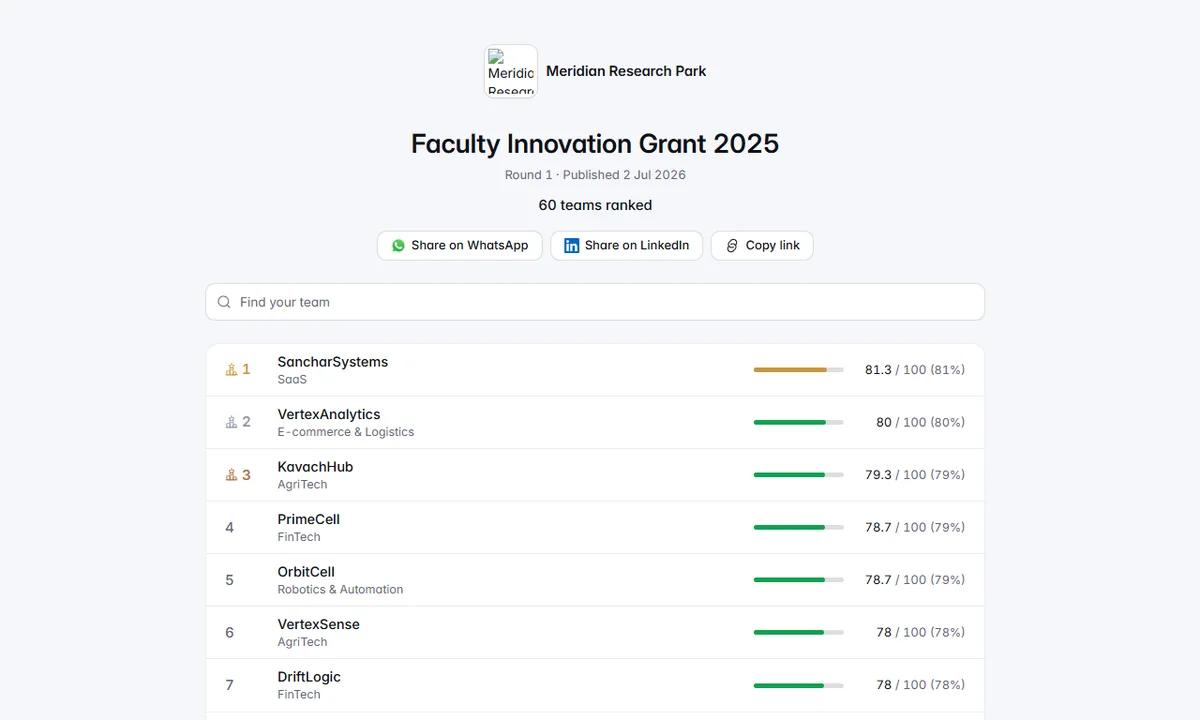
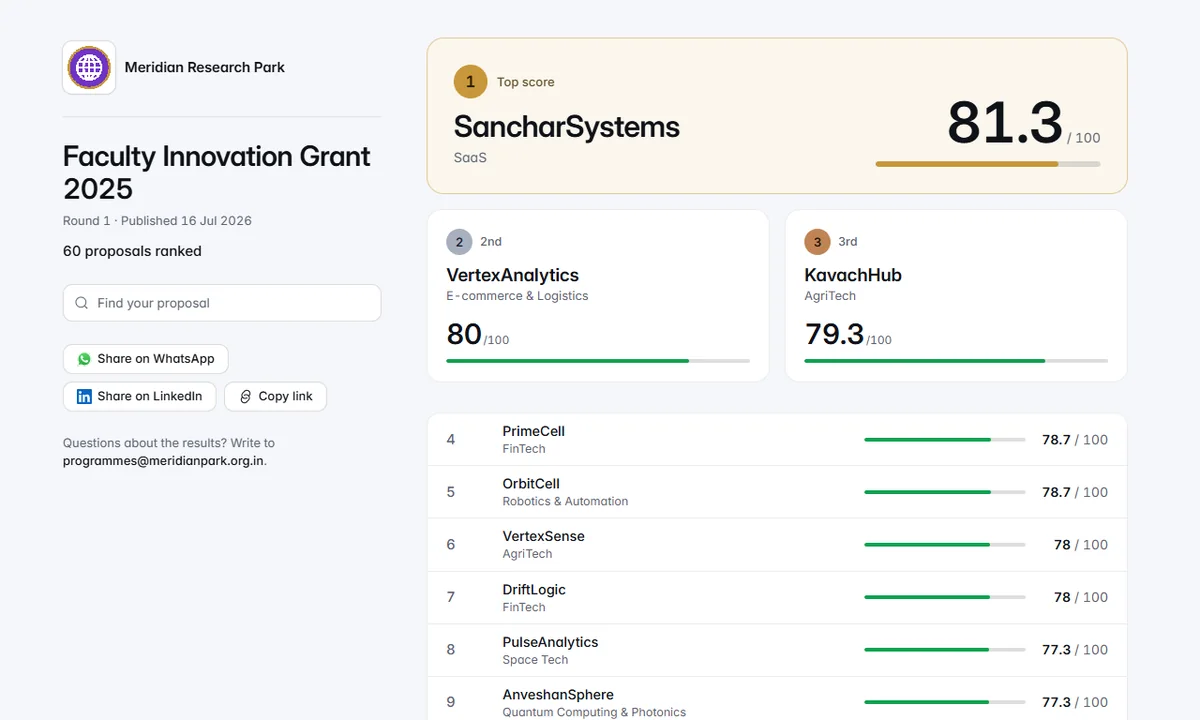
The leader first, the second and third side by side, then everyone else grouped by outcome. Publish now or at a set time.Check and publish prepares a public results page with each team's rank, score, sector and decision badge. It opens with the leader in a card of its own and the second and third side by side, then groups everyone else as also selected, waiting list and other ranked teams, so each team sees which side of the line it is on. Publish now or at a set time, and email every applicant the link once.
Verified-email voting, spikes flagged for review and an optional blend into the jury's score, available once your organisation turns it on.Let the public vote for entries, available once your organisation turns it on. Voters confirm their email through a one-time link, and the address is never stored with the vote. Sudden spikes and private relays are flagged for review, Vote Integrity shows where every vote went, and you choose whether the vote blends into the jury's score. Vote Reach then turns it into a line for sponsors.

IdeaScore AI drafts two short lines per team from its summary, in running order. Edit any line, then print the run sheet or copy it.Draft team intros asks IdeaScore AI for two short lines per team, read from the team's stored summary: what it builds and for whom, then one concrete thing such as a pilot or a customer. The intros arrive in running order and every line can be edited in place. Print the run sheet with names and intros, or copy them all as plain text.
Visits over 30 days, started and submitted applications, where people came from, and a share kit with a link and a QR code.The Public Pages card on the programme dashboard shows how your public pages are doing: visits over the last 30 days, how many started an application and how many submitted, and where people came from. Its share kit has the link to copy and a QR code to download for posters and slides.
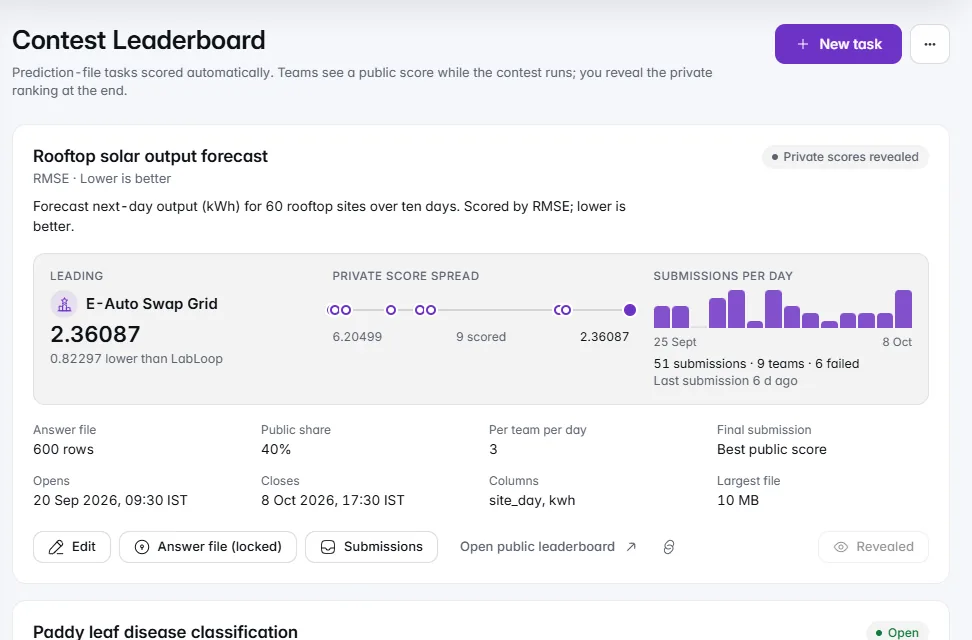
Teams upload predictions, scored automatically against your private answer file, with a public leaderboard until you reveal the rest.Set a task, upload your answer file, and teams submit predictions that are scored automatically on accuracy, F1, RMSE, MAE, ROC AUC or log loss. A public leaderboard shows the standing on the share you choose, while the rest stays private until you reveal it. Each task shows its leader, the spread of scores and submissions per day.
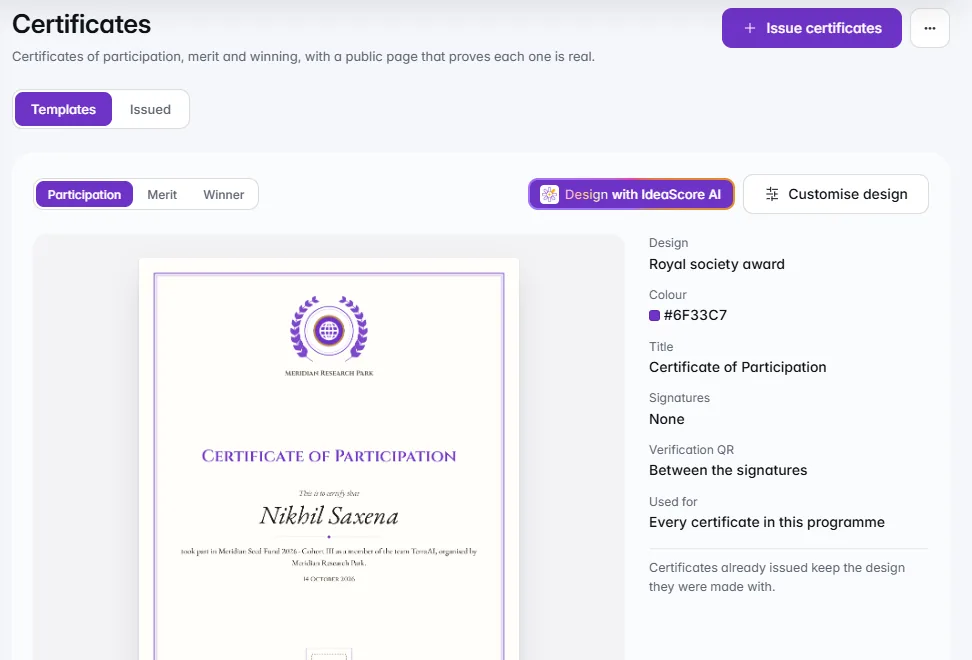
Ten designs with your logo, colour and signatures. Each certificate carries a QR code anyone can verify, and you can revoke it.Issue participation, merit and winner certificates from ten designs, with your logo, a partner logo, your colour, your words and signatures, and a live preview of the real certificate. Each one carries a QR code and ID that anyone can check, you can revoke one at any time, and participants download theirs from their portal.
Lineup, running order, timings, breaks and jurors in one place. On the day, the run sheet shows the session as one track and whether you are running late.
The team on stage, the timer, jurors and running order on one screen. On a bad connection the last good view stays up and the countdown keeps running.
The team on stage as the hero, a timer the back row can read and your branding throughout. The board follows light or dark.
The leader first, the second and third side by side, then everyone else grouped by outcome. Publish now or at a set time.
Verified-email voting, spikes flagged for review and an optional blend into the jury's score, available once your organisation turns it on.
IdeaScore AI drafts two short lines per team from its summary, in running order. Edit any line, then print the run sheet or copy it.
Visits over 30 days, started and submitted applications, where people came from, and a share kit with a link and a QR code.
Teams upload predictions, scored automatically against your private answer file, with a public leaderboard until you reveal the rest.
Ten designs with your logo, colour and signatures. Each certificate carries a QR code anyone can verify, and you can revoke it.
Running order
Jurors
Audience link and QR
Slots for teams
Weak connections
Earlier decks restored
Print run sheet
Results on a schedule
Rank bands for teams
Flagged votes
Vote Reach
Certificate verification
Running order
Jurors
Audience link and QR
Slots for teams
Weak connections
Earlier decks restored
Print run sheet
Results on a schedule
Rank bands for teams
Flagged votes
Vote Reach
Certificate verification
A 30-minute walkthrough with a product specialist, using your programme's form and criteria.